一、前言说明
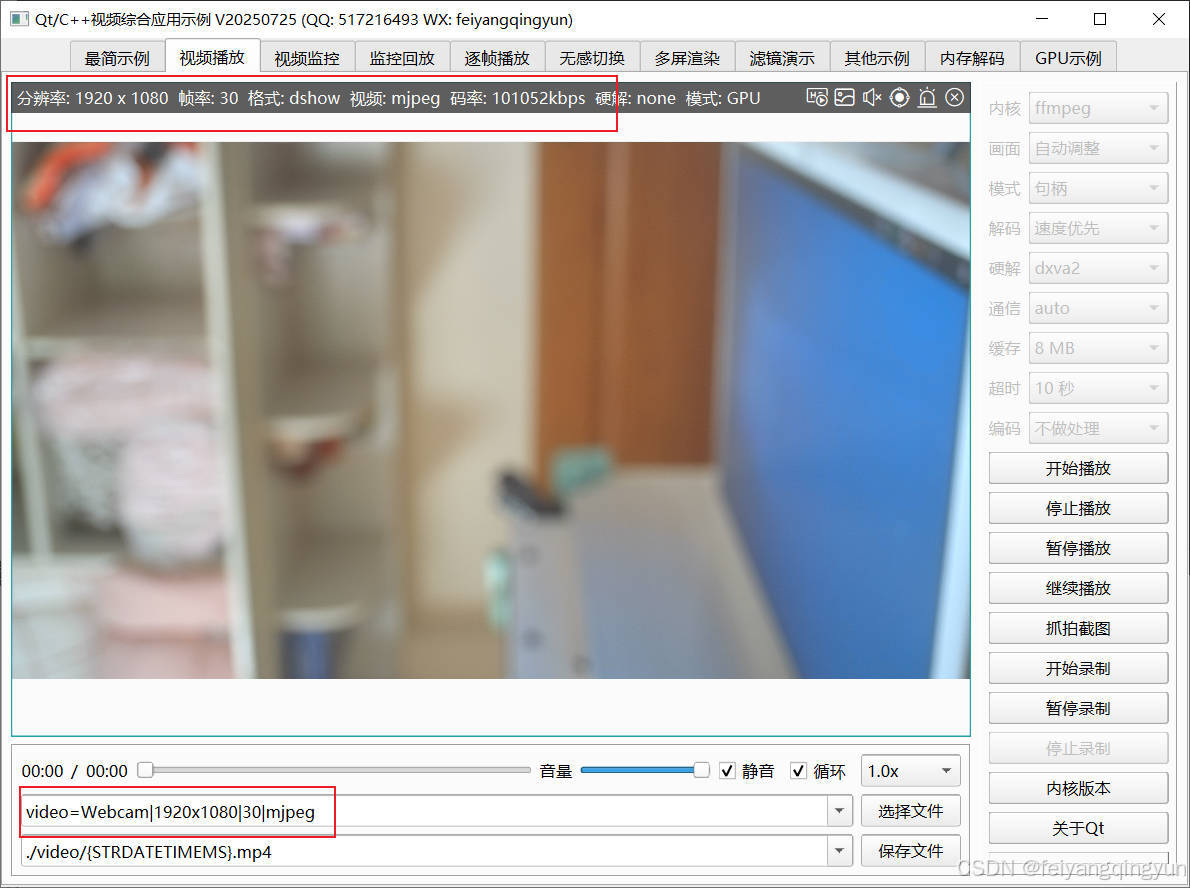
ffmpeg的功能真的是包罗万象,除了基本的编解码,还有个专门的avdevice模块用来对本地设备的采集支持,最开始用到ffmpeg采集本地摄像头的缘由,还不是因为Qt不给力,Qt5开始有个qcamera类,但是只能在windows或者部分linux系统才有用,而且功能非常有限,尤其是在嵌入式linux上使用非常鸡肋,几乎是无用状态,后面也尝试用v4l2这个万能方案采集,这个是通用的linux多媒体框架,只能在linux上使用,所有后面慢慢发展成了win上使用qcamera采集,linux使用v4l2采集的方式,依然不够满足,后面自从用了ffmpeg做音视频的解码后,发现他居然也支持本地设备采集,所以用ffmpeg实现了对应的功能,显示效果比v4l2好很多,毕竟ffmpeg这边采集后解码出来的yuv数据可以直接用qopenglwidget绘制,而v4l2采集后转成了qimage然后用painter绘制,性能上大打折扣,何不直接用ffmpeg方案做跨平台的采集呢。
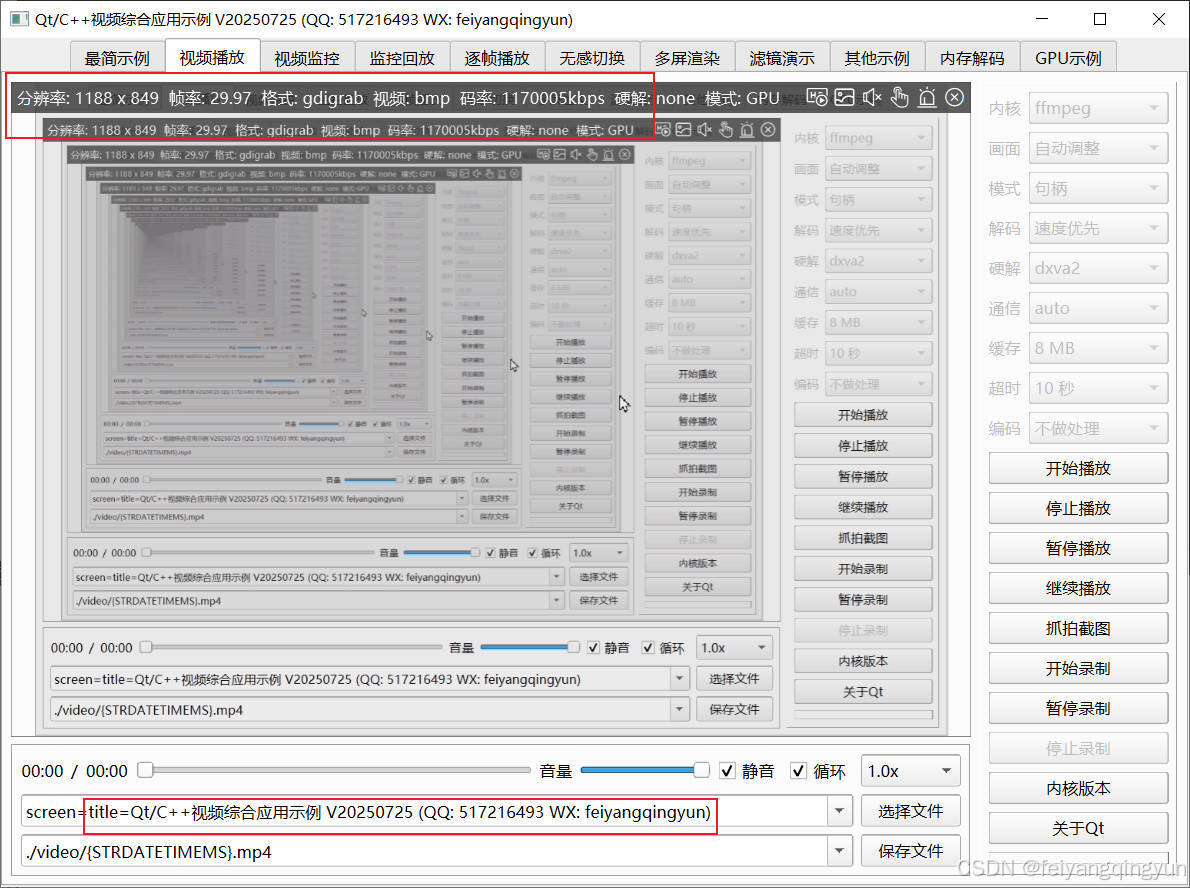
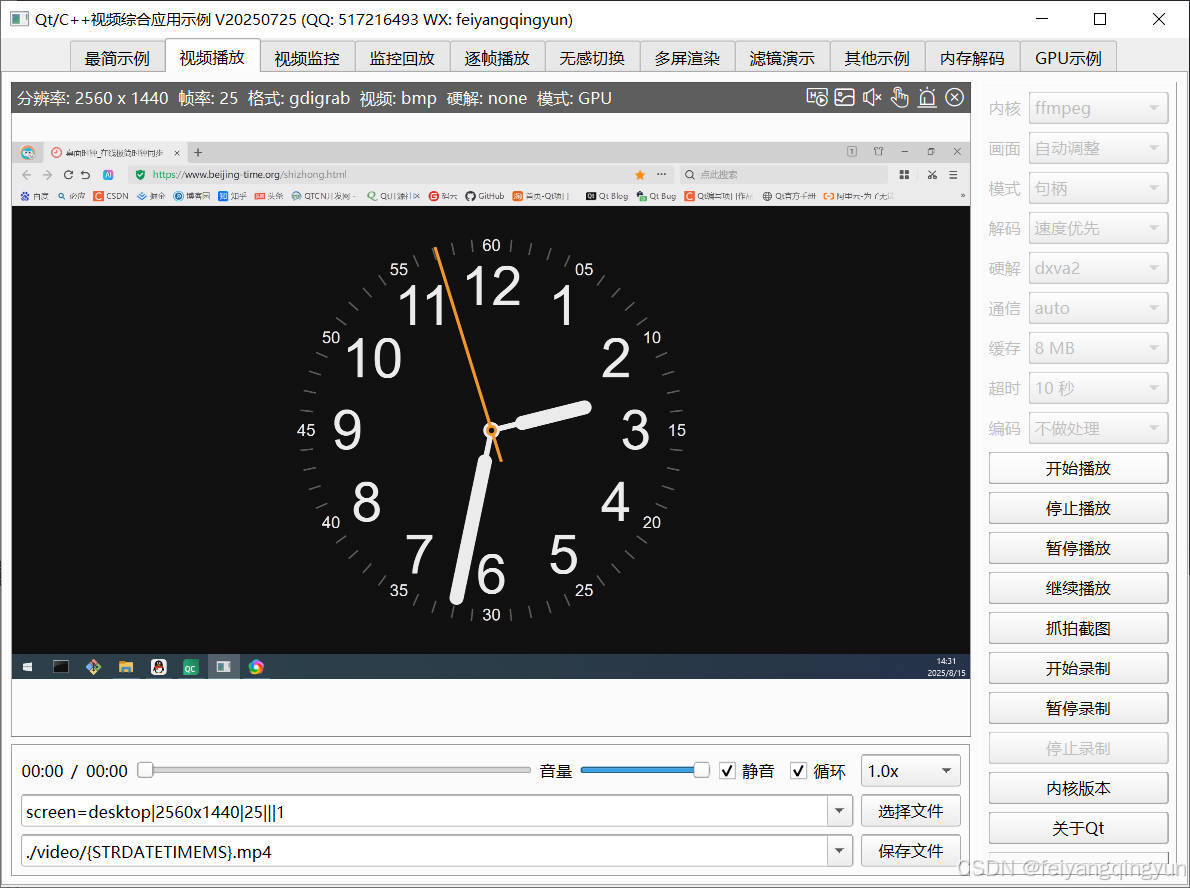
实现完采集本地USB摄像头,后面又有不少用户希望能够采集本地桌面,这些好了,只能用ffmpeg做,而且也是最方便的,只需要在之前采集本地摄像头的框架代码基础上,改动几行代码即可,非常的方便快速,不得不说ffmpeg底层架构的非常棒。采集桌面还可以指定采集区域以及不同的屏幕,不指定的话默认采集整个屏幕,有时候是双屏多屏幕的,所以围绕这块,专门做了很多参数设置,可以指定哪个屏幕采集,指定屏幕对应的区域范围,指定采集帧率,林林总总都搞定以后,又来个新的需求,能不能采集指定应用程序窗口呢?答案也是可以的,所以后面又做了个先枚举本地所有应用程序窗口的函数,让用户下拉框选择,然后指定对应窗口的标题进行采集,无论程序拖动到哪个位置,还能正常采集,目前还有个缺陷,那就是窗体大小发生变化后,不能正常识别新的大小,不知道各位大佬有没有好的思路方案。
二、效果图
三、相关地址
- 国内站点:https://gitee.com/feiyangqingyun
- 国际站点:https://github.com/feiyangqingyun
- 个人作品:https://blog.csdn.net/feiyangqingyun/article/details/97565652
- 文件地址:https://pan.baidu.com/s/1d7TH_GEYl5nOecuNlWJJ7g 提取码:01jf 文件名:bin_video_demo。
四、功能特点
- 同时支持多种解码内核,包括qmedia内核(Qt4/Qt5/Qt6)、ffmpeg内核(ffmpeg2/ffmpeg3/ffmpeg4/ffmpeg5/ffmpeg6)、vlc内核(vlc2/vlc3)、mpv内核(mpv1/mp2)、mdk内核、海康sdk、easyplayer内核等。
- 非常完善的多重基类设计,新增一种解码内核只需要实现极少的代码量,就可以应用整套机制,极易拓展。
- 同时支持多种画面显示策略,自动调整(原始分辨率小于显示控件尺寸则按照原始分辨率大小显示,否则等比缩放)、等比缩放(永远等比缩放)、拉伸填充(永远拉伸填充)。所有内核和所有视频显示模式下都支持三种画面显示策略。
- 同时支持多种视频显示模式,句柄模式(传入控件句柄交给对方绘制控制)、绘制模式(回调拿到数据后转成QImage用QPainter绘制)、GPU模式(回调拿到数据后转成yuv用QOpenglWidget绘制)。
- 支持多种硬件加速类型,ffmpeg可选dxva2、d3d11va等,vlc可选any、dxva2、d3d11va,mpv可选auto、dxva2、d3d11va,mdk可选dxva2、d3d11va、cuda、mft等。不同的系统环境有不同的类型选择,比如linux系统有vaapi、vdpau,macos系统有videotoolbox。
- 解码线程和显示窗体分离,可指定任意解码内核挂载到任意显示窗体,动态切换。
- 支持共享解码线程,默认开启并且自动处理,当识别到相同的视频地址,共享一个解码线程,在网络视频环境中可以大大节约网络流量以及对方设备的推流压力。国内顶尖视频厂商均采用此策略。这样只要拉一路视频流就可以共享到几十个几百个通道展示。
- 自动识别视频旋转角度并绘制,比如手机上拍摄的视频一般是旋转了90度的,播放的时候要自动旋转处理,不然默认是倒着的。
- 自动识别视频流播放过程中分辨率的变化,在视频控件上自动调整尺寸。比如摄像机可以在使用过程中动态配置分辨率,当分辨率改动后对应视频控件也要做出同步反应。
- 音视频文件无感知自动切换循环播放,不会出现切换期间黑屏等肉眼可见的切换痕迹。
- 视频控件同时支持任意解码内核、任意画面显示策略、任意视频显示模式。
- 视频控件悬浮条同时支持句柄、绘制、GPU三种模式,非绝对坐标移来移去。
- 本地摄像头设备支持指定设备名称、分辨率、帧率进行播放。
- 本地桌面采集支持设定采集区域、偏移值、指定桌面索引、帧率、多个桌面同时采集等。还支持指定窗口标题采集固定窗口。
- 录像文件同时支持打开的视频文件、本地摄像头、本地桌面、网络视频流等。
- 瞬间响应打开和关闭,无论是打开不存在的视频或者网络流,探测设备是否存在,读取中的超时等待,收到关闭指令立即中断之前的操作并响应。
- 支持打开各种图片文件,支持本地音视频文件拖曳播放。
- 视频流通信方式可选tcp/udp,有些设备可能只提供了某一种协议通信比如tcp,需要指定该种协议方式打开。
- 可设置连接超时时间(视频流探测用的超时时间)、读取超时时间(采集过程中的超时时间)。
- 支持逐帧播放,提供上一帧/下一帧函数接口,可以逐帧查阅采集到的图像。
- 音频文件自动提取专辑信息比如标题、艺术家、专辑、专辑封面,自动显示专辑封面。
- 视频响应极低延迟0.2s左右,极速响应打开视频流0.5s左右,专门做了优化处理。
- 支持H264/H265编码(现在越来越多的监控摄像头是H265视频流格式)生成视频文件,内部自动识别切换编码格式。
- 支持用户信息中包含特殊字符(比如用户信息中包含+#@等字符)的视频流播放,内置解析转义处理。
- 支持滤镜,各种水印及图形效果,支持多个水印和图像,可以将OSD标签信息和各种图形信息写入到MP4文件。
- 支持视频流中的各种音频格式,AAC、PCM、G.726、G.711A、G.711Mu、G.711ulaw、G.711alaw、MP2L2等都支持,推荐选择AAC兼容性跨平台性最好。
- 内核ffmpeg采用纯qt+ffmpeg解码,非sdl等第三方绘制播放依赖,gpu绘制采用qopenglwidget,音频播放采用qaudiooutput。
- 内核ffmpeg和内核mdk支持安卓,其中mdk支持安卓硬解码,性能非常凶残。
- 可以切换音视频轨道,也就是节目通道,可能ts文件带了多个音视频节目流,可以分别设置要播放哪一个,可以播放前设置好和播放过程中动态设置。
- 可以设置视频旋转角度,可以播放前设置好和播放过程中动态改变。
- 视频控件悬浮条自带开始和停止录像切换、声音静音切换、抓拍截图、关闭视频等功能。
- 音频组件支持声音波形值数据解析,可以根据该值绘制波形曲线和柱状声音条,默认提供了声音振幅信号。
- 标签和图形信息支持三种绘制方式,绘制到遮罩层、绘制到图片、源头绘制(对应信息可以存储到文件)。
- 通过传入一个url地址,该地址可以带上通信协议、分辨率、帧率等信息,无需其他设置。
- 保存视频到文件支持三种策略,自动处理、仅限文件、全部转码,转码策略支持自动识别、转264、转265,编码保存支持指定分辨率缩放或者等比例缩放。比如对保存文件体积有要求可以指定缩放后再存储。
- 支持加密保存文件和解密播放文件,可以指定秘钥文本。
- 提供的监控布局类支持64通道同时显示,还支持各种异型布局,比如13通道,手机上6行2列布局。各种布局可以自由定义。
- 支持电子放大,在悬浮条切换到电子放大模式,在画面上选择需要放大的区域,选取完毕后自动放大,再次切换放大模式可以复位。
- 各组件中极其详细的打印信息提示,尤其是报错信息提示,封装的统一打印格式。针对现场复杂的设备环境测试极其方便有用,相当于精确定位到具体哪个通道哪个步骤出错。
- 同时提供了简单示例、视频播放器、多画面视频监控、监控回放、逐帧播放、多屏渲染等单独窗体示例,专门演示对应功能如何使用。
- 监控回放可选不同厂家类型、回放时间段、用户信息、指定通道。支持切换回放进度。
- 可以从声卡设备下拉框选择声卡播放声音,提供对应的切换声卡函数接口。
- 支持编译到手机app使用,提供了专门的手机app布局界面,可以作为手机上的视频监控使用。
- 代码框架和结构优化到最优,性能强悍,注释详细,持续迭代更新升级。
- 源码支持windows、linux、mac、android等,支持各种国产linux系统,包括但不限于统信UOS/中标麒麟/银河麒麟等。还支持嵌入式linux。
- 源码支持Qt4、Qt5、Qt6,兼容所有版本。
五、相关代码
#include "deviceinfohelper.h"
#include "applicationwindow.h"
#include "qapplication.h"
#include "qprocess.h"
#if (QT_VERSION >= QT_VERSION_CHECK(5,0,0))
#include "qscreen.h"
#endif#ifdef multimedia
#include <QtMultimedia>
#endif
#ifdef ffmpegdevice
#include "ffmpegdevice.h"
#endifQList<QRect> DeviceInfoHelper::getScreenRects()
{QList<QRect> rects;
#if (QT_VERSION >= QT_VERSION_CHECK(5,0,0))int screenCount = qApp->screens().count();QList<QScreen *> screens = qApp->screens();for (int i = 0; i < screenCount; ++i) {QScreen *screen = screens.at(i);//需要根据缩放比来重新调整宽高qreal ratio = screen->devicePixelRatio();QRect rect = screen->geometry();rect.setWidth(rect.width() * ratio);rect.setHeight(rect.height() * ratio);rects << rect;}
#elseint screenCount = qApp->desktop()->screenCount();QDesktopWidget *desk = qApp->desktop();for (int i = 0; i < screenCount; ++i) {QRect rect = desk->screenGeometry(i);rects << rect;}
#endifreturn rects;
}QRect DeviceInfoHelper::getScreenRect(int screenIndex)
{//指定了屏幕索引则取指定的(没有指定则取当前鼠标所在屏幕)QRect rect;QList<QRect> rects = DeviceInfoHelper::getScreenRects();if (screenIndex >= 0 && screenIndex < rects.count()) {rect = rects.at(screenIndex);} else {//当前屏幕区域包含当前鼠标所在坐标则说明是当前屏幕QPoint pos = QCursor::pos();foreach (QRect r, rects) {if (r.contains(pos)) {rect = r;break;}}}return rect;
}QStringList DeviceInfoHelper::getScreenInfo()
{QStringList infos;QList<QRect> rects = DeviceInfoHelper::getScreenRects();for (int i = 0; i < rects.count(); ++i) {QRect rect = rects.at(i);infos << QString("DISPLAY%1 (%2 x %3)").arg(i).arg(rect.width()).arg(rect.height());}return infos;
}QString DeviceInfoHelper::getScreenUrl(const QString &url)
{QString device = url;int index = device.mid(7, 1).toInt();device.replace("(", "");device.replace(")", "");device.replace("x", "");QStringList list = device.split(" ");if (list.count() == 4) {
#if defined(Q_OS_WIN)QString flag = "desktop";
#elif defined(Q_OS_LINUX)QString flag = ":0.0";
#elif defined(Q_OS_MAC)QString flag = "0";
#endifdevice = QString("screen=%1|%2x%3|25|||%4").arg(flag).arg(list.at(1)).arg(list.at(3)).arg(index);}return device;
}void DeviceInfoHelper::checkSize(int &width, int &height)
{//ffmpeg默认只支持偶数/虚拟机中很可能是奇数的分辨率if (width % 2 != 0) {width--;}if (height % 2 != 0) {height--;}
}QString DeviceInfoHelper::getResolution(int width, int height)
{DeviceInfoHelper::checkSize(width, height);return QString("%1x%2").arg(width).arg(height);
}QString DeviceInfoHelper::getResolution(const QString &resolution)
{QStringList sizes = DeviceInfoHelper::getSizes(resolution);return getResolution(sizes.at(0).toInt(), sizes.at(1).toInt());
}QStringList DeviceInfoHelper::getSizes(const QString &size)
{QStringList sizes;if (size.contains("*")) {sizes = size.split("*");} else if (size.contains("x")) {sizes = size.split("x");}return sizes;
}void DeviceInfoHelper::checkRect(int screenIndex, QString &resolution, int &offsetX, int &offsetY)
{QRect rect = DeviceInfoHelper::getScreenRect(screenIndex);if (resolution == "0x0") {resolution = DeviceInfoHelper::getResolution(rect.width(), rect.height());} else {resolution = DeviceInfoHelper::getResolution(resolution);}//偏移值必须小于分辨率否则重置if (offsetX > rect.width()) {offsetX = 0;}if (offsetY > rect.height()) {offsetY = 0;}//判断设定的偏移值加上设定的分辨率是否超出了真实的分辨率QStringList sizes = DeviceInfoHelper::getSizes(resolution);int width = sizes.at(0).toInt();int height = sizes.at(1).toInt();if (offsetX + width > rect.width()) {width = rect.width() - offsetX;}if (offsetY + height > rect.height()) {height = rect.height() - offsetY;}//如果超出了分辨率则重新设置采集的分辨率resolution = DeviceInfoHelper::getResolution(width, height);//多个屏幕需要加上屏幕起始坐标if (offsetX == 0) {offsetX = rect.x();} else {offsetX += rect.x();}if (offsetY == 0) {offsetY = rect.y();} else {offsetY += rect.y();}//qDebug() << TIMEMS << screenIndex << offsetX << offsetY << resolution;
}void DeviceInfoHelper::checkOption(const QString &option, QString &format, QString &resolution, int &minFps, int &maxFps)
{//vcodec=mjpeg min s=1920x1080 fps=25 max s=1920x1080 fps=30QStringList list = option.split(" ");if (list.count() == 7) {format = list.at(0).split("=").last();resolution = list.at(5).split("=").last();//这里为什么转float/因为有些时候是60.001这种帧率/转int会失败minFps = list.at(3).split("=").last().toFloat();maxFps = list.at(6).split("=").last().toFloat();}
}QStringList DeviceInfoHelper::getOptions(const QString &audioDevice, const QString &videoDevice)
{if (videoDevice == "none" && audioDevice == "none") {return QStringList();}//优先获取视频设备的参数QString url;if (videoDevice != "none") {url = "video=" + videoDevice;} else {url = "audio=" + audioDevice;}DeviceInfoHelper::deviceOption.clear();DeviceInfoHelper::getDeviceOption(url);return DeviceInfoHelper::deviceOption;
}QString DeviceInfoHelper::getOptionUrl(const QString &audioDevice, const QString &videoDevice, const QString &titleDevice, const QString &option)
{QString url = DeviceInfoHelper::getDeviceUrl(audioDevice, videoDevice, titleDevice);if (!url.isEmpty() && !option.isEmpty() && !url.startsWith("audio=")) {QString format, resolution;int minFps, maxFps;DeviceInfoHelper::checkOption(option, format, resolution, minFps, maxFps);url = QString("%1|%2|%3|%4").arg(url).arg(resolution).arg(maxFps).arg(format);}return url;
}QStringList DeviceInfoHelper::deviceOption = QStringList();
void DeviceInfoHelper::getDeviceOption(const QString &url)
{//为空则重新获取if (DeviceInfoHelper::deviceOption.isEmpty()) {
#ifdef ffmpegdeviceDeviceInfoHelper::deviceOption = FFmpegDevice::getDeviceOption(url);
#endif}//linux上还需要用命令行获取对应的参数if (DeviceInfoHelper::deviceOption.isEmpty()) {DeviceInfoHelper::deviceOption = DeviceInfoHelper::getDeviceOption2(url);}
}//安装工具命令 sudo apt-get install v4l-utils
//获取所有设备 v4l2-ctl --list-devices
//获取所有格式 v4l2-ctl --list-formats -d /dev/video0
//获取所有参数 v4l2-ctl --list-formats-ext -d /dev/video0
QStringList DeviceInfoHelper::getDeviceOption2(const QString &url)
{QStringList options;
#ifdef Q_OS_LINUX
#ifndef Q_OS_WASMQProcess process;QString devName = url;devName.replace("video=", "");process.start("v4l2-ctl", QStringList() << "--list-formats-ext" << "-d" << devName);process.waitForFinished();QString result = process.readAll();QStringList list = result.split("\t");static QString pixel_format;static QString video_size;static int min_fps = 200;static int max_fps = 0;foreach (QString line, list) {line = line.trimmed();line.replace("\r", "");line.replace("\n", "");if (line.startsWith("Pixel Format") || line.contains("]:")) {QString format = "yuyv422";if (line.contains("MJPG")) {format = "mjpeg";} else if (line.contains("H264")) {format = "h264";}//不同的格式说明是新的/要if (format != pixel_format) {//存在格式说明当前是新的一个格式/需要把上一个的末尾的信息添加if (!pixel_format.isEmpty()) {options << QString("pixel_format=%1 min s=%2 fps=%3 max s=%2 fps=%4").arg(pixel_format).arg(video_size).arg(min_fps).arg(max_fps);}//复位分辨率和帧率pixel_format = format;video_size.clear();min_fps = 200;max_fps = 0;}} else if (line.startsWith("Size")) {//新的分辨率则把上一个分辨率带帧率的信息添加QString size = line.split(" ").last();if (size != video_size) {if (!video_size.isEmpty()) {options << QString("pixel_format=%1 min s=%2 fps=%3 max s=%2 fps=%4").arg(pixel_format).arg(video_size).arg(min_fps).arg(max_fps);}//复位帧率video_size = size;min_fps = 200;max_fps = 0;}} else if (line.startsWith("Interval")) {//取出当前分辨率分组中最大最小帧率line = line.split("(").last();line = line.split(".").first();int fps = line.toInt();if (fps > max_fps) {max_fps = fps;}if (fps < min_fps) {min_fps = fps;}}}//添加末尾结束的一个if (min_fps != 200 && max_fps != 0) {options << QString("pixel_format=%1 min s=%2 fps=%3 max s=%2 fps=%4").arg(pixel_format).arg(video_size).arg(min_fps).arg(max_fps);}//搞完后需要复位pixel_format.clear();video_size.clear();min_fps = 200;max_fps = 0;
#endif
#endifreturn options;
}QStringList DeviceInfoHelper::getDeviceFormat(const QString &url)
{QStringList formats;DeviceInfoHelper::getDeviceOption(url);foreach (QString option, DeviceInfoHelper::deviceOption) {QStringList list = option.split(" ");QString format = list.at(0).split("=").at(1);if (!formats.contains(format)) {formats << format;}}return formats;
}QStringList DeviceInfoHelper::getDeviceResolution(const QString &url, const QString &format)
{QStringList resolutions;DeviceInfoHelper::getDeviceOption(url);foreach (QString option, DeviceInfoHelper::deviceOption) {QStringList list = option.split(" ");QString formatx = list.at(0).split("=").at(1);if (format == formatx) {QString resolution = list.at(2).split("=").at(1);resolutions << resolution;}}return resolutions;
}QStringList DeviceInfoHelper::getDeviceFrameRate(const QString &url, const QString &format, const QString &resolution)
{QStringList frameRates;DeviceInfoHelper::getDeviceOption(url);foreach (QString option, DeviceInfoHelper::deviceOption) {QStringList list = option.split(" ");QString formatx = list.at(0).split("=").at(1);if (format == formatx) {QString resolutionx = list.at(2).split("=").at(1);if (resolution == resolutionx) {QString minFps = list.at(3).split("=").at(1);QString maxFps = list.at(6).split("=").at(1);frameRates << minFps << maxFps;break;}}}return frameRates;
}QStringList DeviceInfoHelper::getAudioDevices()
{QStringList names;
#ifdef multimedia
#if (QT_VERSION >= QT_VERSION_CHECK(6,2,0))QList<QAudioDevice> devices = QMediaDevices::audioInputs();foreach (QAudioDevice device, devices) {names << device.description();}
#else//目前发现Qt4.8会不全/尾部字符串被暴力裁剪/Qt4.7中文乱码/一般建议Qt5使用QList<QAudioDeviceInfo> devices = QAudioDeviceInfo::availableDevices(QAudio::AudioInput);foreach (QAudioDeviceInfo device, devices) {//部分版本会重复比如Qt5.9会输出两次/需要去重QString name = device.deviceName();if (!names.contains(name)) {names << name;}}
#endif
#endifreturn names;
}QStringList DeviceInfoHelper::getVideoDevices()
{QStringList names;
#ifdef multimedia
#if (QT_VERSION >= QT_VERSION_CHECK(6,2,0))QList<QCameraDevice>cameras = QMediaDevices::videoInputs();foreach (QCameraDevice camera, cameras) {names << camera.description();}
#elif (QT_VERSION >= QT_VERSION_CHECK(5,0,0))QList<QCameraInfo> cameras = QCameraInfo::availableCameras();foreach (QCameraInfo camera, cameras) {names << camera.description();}
#endif
#endifreturn names;
}QStringList DeviceInfoHelper::getVideoDevices2()
{QStringList names;
#ifdef Q_OS_LINUX
#ifndef Q_OS_WASMQProcess process;process.start("ls", QStringList() << "/dev/");process.waitForFinished();QString result = process.readAll();QStringList list = result.split("\n");foreach (QString line, list) {if (line.startsWith("video")) {names << QString("/dev/%1").arg(line);}}
#endif
#endifreturn names;
}void DeviceInfoHelper::getInputDevices(QStringList &audioDevices, QStringList &videoDevices, bool screen)
{//优先用Qt自带的方式获取audioDevices << DeviceInfoHelper::getAudioDevices();videoDevices << DeviceInfoHelper::getVideoDevices();//这里假设如果存在虚拟屏幕则假设虚拟声卡if (!audioDevices.contains("virtual-audio-capturer") && videoDevices.contains("screen-capture-recorder")) {audioDevices << "virtual-audio-capturer";}//上面没有获取到则用ffmpeg内置函数再获取
#ifdef ffmpegdeviceFFmpegDevice::getInputDevices(false, audioDevices);FFmpegDevice::getInputDevices(true, videoDevices);
#endif//如果为空还需要通过命令行获取if (videoDevices.isEmpty()) {videoDevices << DeviceInfoHelper::getVideoDevices2();}//将屏幕信息加到后面if (screen) {videoDevices << DeviceInfoHelper::getScreenInfo();}
}QString DeviceInfoHelper::getDeviceUrl(const QString &audioDevice, const QString &videoDevice, const QString &titleDevice)
{QString url;if (audioDevice.isEmpty() && videoDevice.isEmpty()) {return url;}//优先添加桌面采集if (videoDevice.startsWith("DISPLAY")) {url = DeviceInfoHelper::getScreenUrl(videoDevice);return url;}//其次添加程序窗口if (!titleDevice.isEmpty() && titleDevice != "none") {url = "screen=title=" + titleDevice;return url;}QString audioName;if (!audioDevice.isEmpty() && audioDevice != "none") {audioName = "audio=" + audioDevice;}QString videoName;if (!videoDevice.isEmpty() && videoDevice != "none") {videoName = "video=" + videoDevice;}if (audioName.isEmpty() && videoName.isEmpty()) {return url;}QStringList list;if (!videoName.isEmpty()) {list << videoName;}if (!audioName.isEmpty()) {list << audioName;}url = list.join(":");return url;
}void DeviceInfoHelper::initInputDevices(QComboBox *cboxAudioDevice, QComboBox *cboxVideoDevice, QComboBox *cboxTitleDevice, bool none, bool screen)
{QStringList audioDevices, videoDevices;DeviceInfoHelper::getInputDevices(audioDevices, videoDevices, screen);if (cboxAudioDevice) {cboxAudioDevice->clear();if (none) {cboxAudioDevice->addItem("none");}cboxAudioDevice->addItems(audioDevices);}if (cboxVideoDevice) {cboxVideoDevice->clear();if (none) {cboxVideoDevice->addItem("none");}cboxVideoDevice->addItems(videoDevices);}if (cboxTitleDevice) {cboxTitleDevice->clear();if (none) {cboxTitleDevice->addItem("none");}ApplicationWindow::getApplicationWindow(cboxTitleDevice);}
}void DeviceInfoHelper::initInputOptions(QComboBox *cboxAudioDevice, QComboBox *cboxVideoDevice, QComboBox *cboxDeviceOption)
{QString audioDevice = cboxAudioDevice->currentText();QString videoDevice = cboxVideoDevice->currentText();QStringList options = DeviceInfoHelper::getOptions(audioDevice, videoDevice);cboxDeviceOption->clear();cboxDeviceOption->addItems(options);
}void DeviceInfoHelper::setPara(const QStringList &list, int count, int index, int ¶)
{if (count > index && !list.at(index).isEmpty()) {para = list.at(index).toInt();}
}void DeviceInfoHelper::setPara(const QStringList &list, int count, int index, float ¶)
{if (count > index && !list.at(index).isEmpty()) {para = list.at(index).toFloat();}
}void DeviceInfoHelper::setPara(const QStringList &list, int count, int index, QString ¶)
{if (count > index && !list.at(index).isEmpty()) {para = list.at(index);}
}void DeviceInfoHelper::getDevicePara(const QString &url, QString &resolution, int &frameRate, QString &codecName)
{int offsetX, offsetY;float encodeVideoRatio;QString encodeVideoScale;DeviceInfoHelper::getDevicePara(url, resolution, frameRate, codecName, offsetX, offsetY, encodeVideoRatio, encodeVideoScale);
}void DeviceInfoHelper::getDevicePara(const QString &url, QString &resolution, int &frameRate, QString &codecName, int &offsetX, int &offsetY, float &encodeVideoRatio, QString &encodeVideoScale)
{//无论是否带分隔符第一个约定是设备名称QStringList list = url.split("|");int count = list.count();//默认不指定屏幕索引int screenIndex = -1;//判断是否是屏幕采集bool isScreen = url.startsWith("screen=");//带分隔符说明还指定了分辨率或帧率if (count > 1) {QStringList sizes = DeviceInfoHelper::getSizes(list.at(1));if (sizes.count() == 2) {int width = sizes.at(0).toInt();int height = sizes.at(1).toInt();resolution = QString("%1x%2").arg(width).arg(height);} else {resolution = "0x0";}//第三个参数是帧率DeviceInfoHelper::setPara(list, count, 2, frameRate);//取出其他几个参数if (isScreen) {//XY坐标偏移值DeviceInfoHelper::setPara(list, count, 3, offsetX);DeviceInfoHelper::setPara(list, count, 4, offsetY);//屏幕索引DeviceInfoHelper::setPara(list, count, 5, screenIndex);//压缩比率DeviceInfoHelper::setPara(list, count, 6, encodeVideoRatio);//视频缩放DeviceInfoHelper::setPara(list, count, 7, encodeVideoScale);//约定屏幕索引255则取用户自定义的区域if (screenIndex != 255) {DeviceInfoHelper::checkRect(screenIndex, resolution, offsetX, offsetY);}} else {//指定解码器DeviceInfoHelper::setPara(list, count, 3, codecName);//压缩比率DeviceInfoHelper::setPara(list, count, 4, encodeVideoRatio);//视频缩放DeviceInfoHelper::setPara(list, count, 5, encodeVideoScale);}}//没有设置分辨率则重新处理if (resolution == "0x0") {if (!isScreen) {resolution = "640x480";} else {DeviceInfoHelper::checkRect(screenIndex, resolution, offsetX, offsetY);}}//采用第三方录屏只能主屏幕/不能设置分辨率/而且不能指定区域/优点就是效率高而且光标不闪烁if (url.contains("video=screen-capture-recorder")) {resolution = "0x0";codecName = "";if (frameRate <= 0 || frameRate >= 30) {frameRate = 30;}}
}void DeviceInfoHelper::getNormalPara(const QString &url, QString &transport, int &decodeType, int &encodeVideo, int &encodeVideoFps, float &encodeVideoRatio, QString &encodeVideoScale)
{QStringList list = url.split("|");int count = list.count();//通信协议DeviceInfoHelper::setPara(list, count, 1, transport);//解码策略DeviceInfoHelper::setPara(list, count, 2, decodeType);//编码视频格式DeviceInfoHelper::setPara(list, count, 3, encodeVideo);//编码视频帧率DeviceInfoHelper::setPara(list, count, 4, encodeVideoFps);//视频压缩比率DeviceInfoHelper::setPara(list, count, 5, encodeVideoRatio);//视频缩放比例DeviceInfoHelper::setPara(list, count, 6, encodeVideoScale);
}


)


)


上部署Oracle 11g、19C RAC详细图文教程)


)
![6-7 TIM编码器接口 [江科协STM32]](http://pic.xiahunao.cn/6-7 TIM编码器接口 [江科协STM32])
